Showing posts with label research science. Show all posts

Thursday, 6 July 2017

Scopus : search smarter and find faster


With over 69 million items indexed on Scopus, how can you find and organize relevant research and keep updated on new material, so you have more time for other activities? Susannah Beatty outlines some key Scopus features that can help.

Getting to the right results

Whether you jump right in and start with a broad search on Scopus, or you prefer a more targeted and specific search approach, some key search tips can help save you time and lead you to more relevant results. Here are a few to start you off:
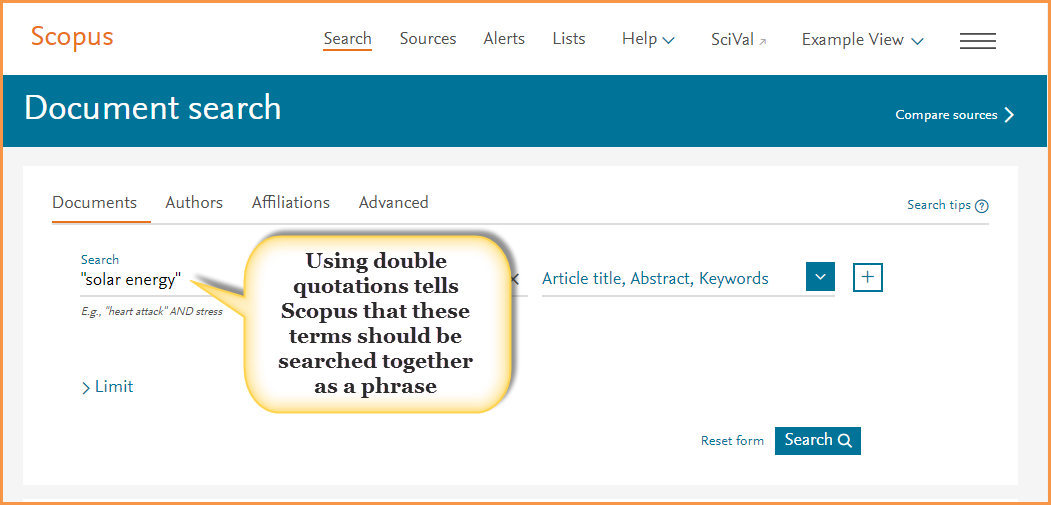
Use double quotations to search phrases. For example, if in the search box you typed: solar energy without quotations, Scopus returns over 168,400 document results. However, if you include the double quotations: “solar energy,” Scopus will look for items where “solar energy” is used as a phrase, reducing your results to just over 80,700 documents.

Analyze and filter your search results. The 80,700+ results returned from our “solar energy” search is still a large number to work with, so how can you narrow this down? Try these two features:
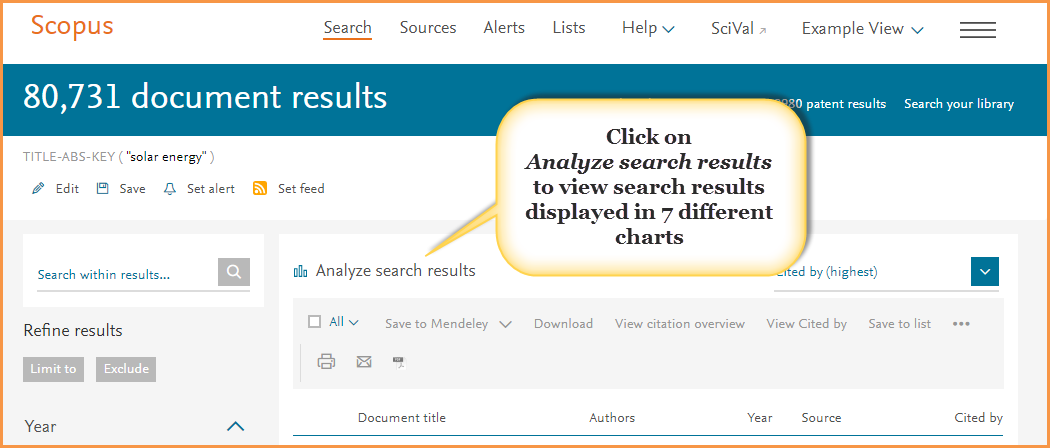
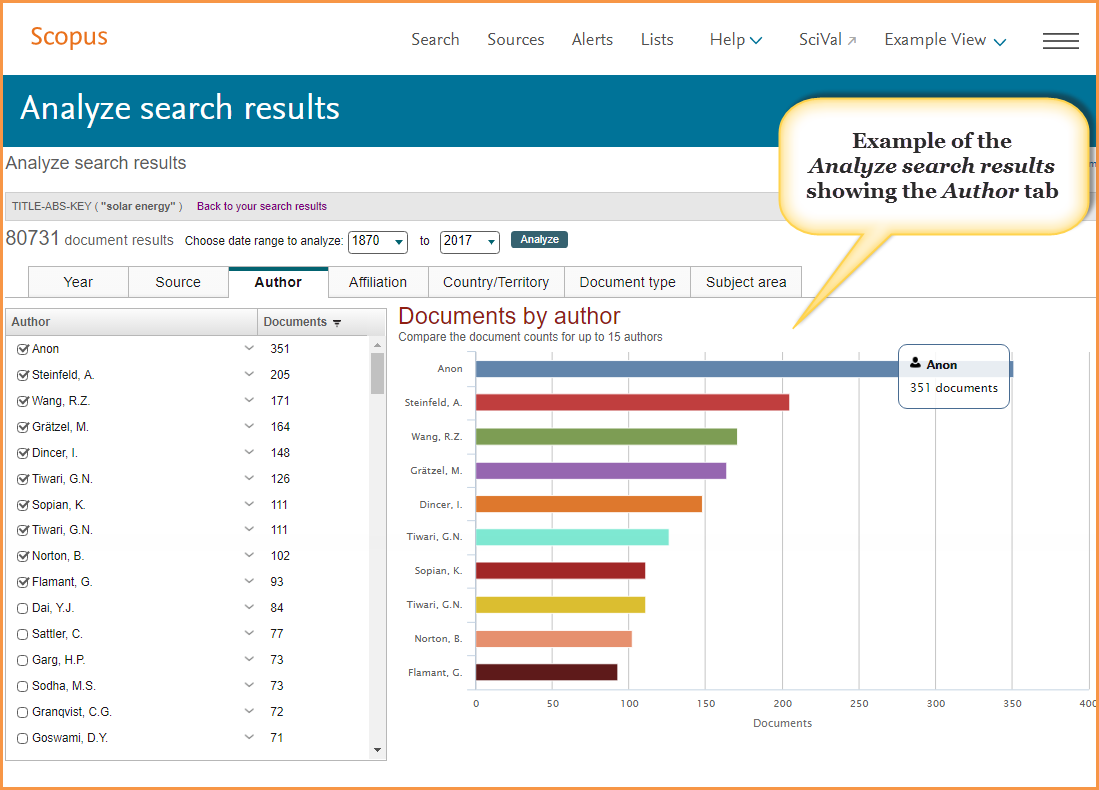
  • Analyze search results: This tool provides a visual analysis of your search results broken up into seven categories (year, source, author, affiliation, country or territory, document type and subject area). Use these charts to gain a different perspective and understanding of your results. For example, the “Year” chart can help you quickly identify the most prolific authors in your research topic.
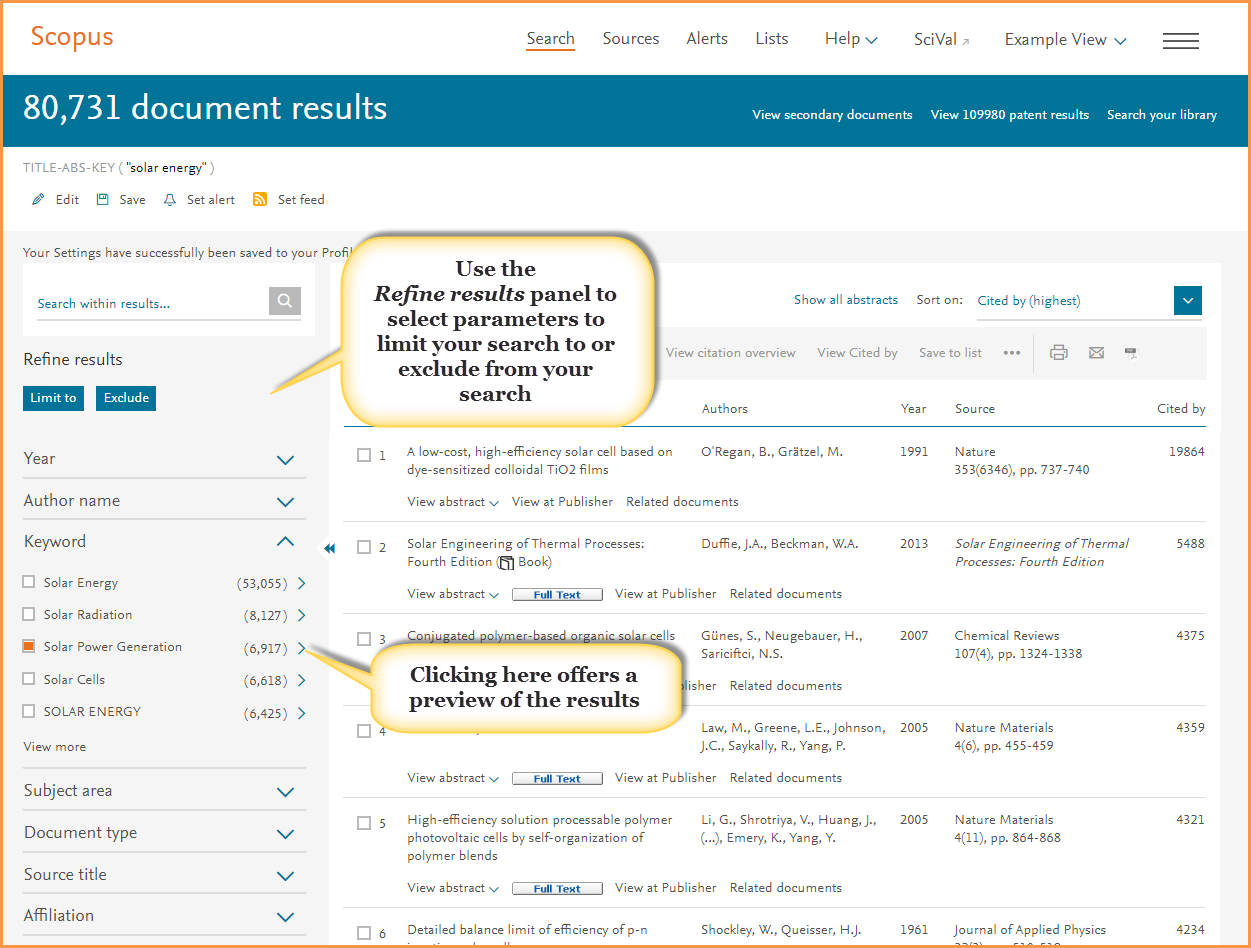
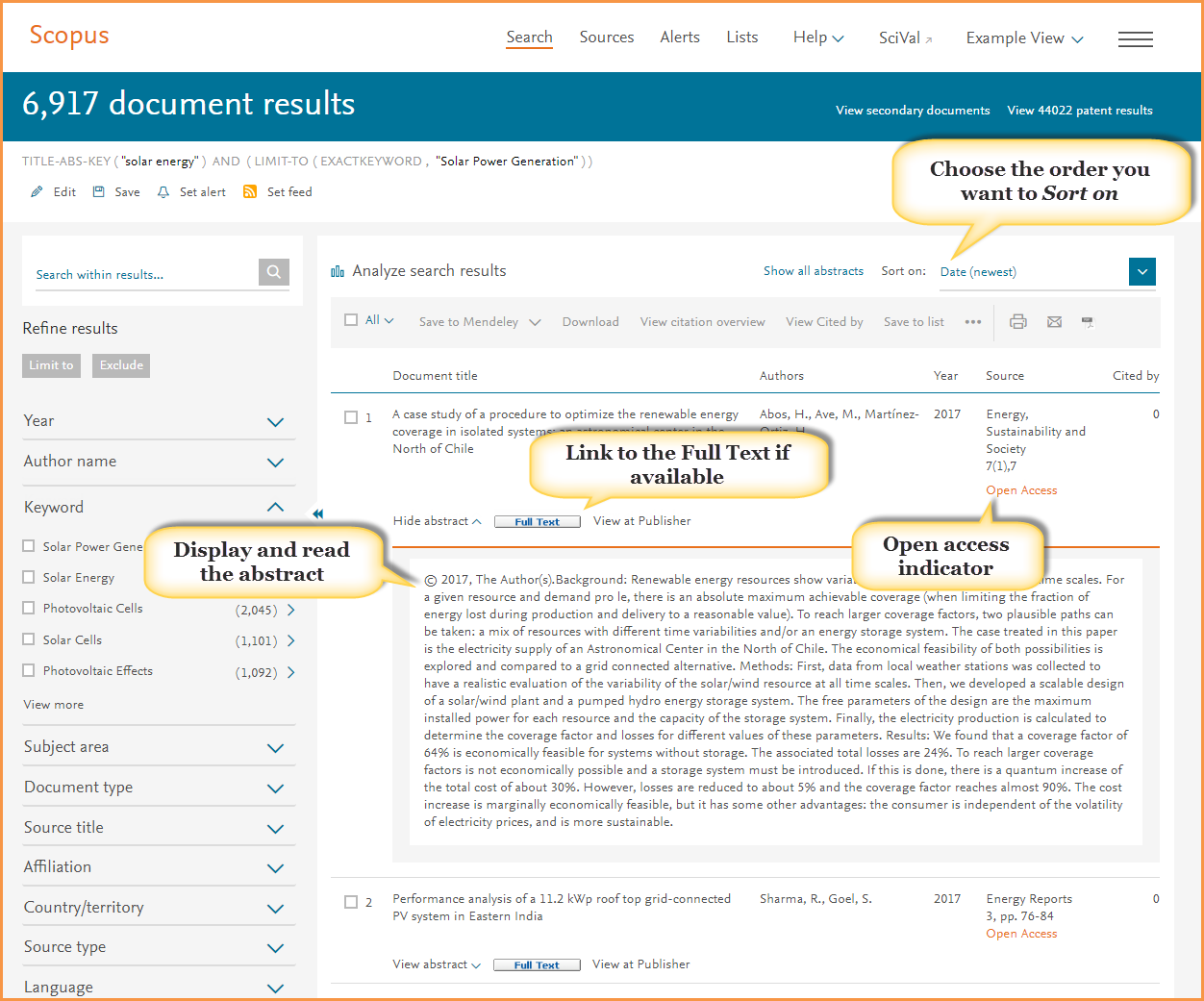
  • Refine results panel: To the left of your results list you will find parameters that you can limit your search results by, or exclude from your results. For example, you could limit your results to documents that include “Solar Power Generation” as a keyword. TIP: Before you go ahead and select the term, open the preview window (click on the arrow to the right of the number) to get an idea of what type of results this will produce.
BONUS: Once you’ve refined your results, save your search and create an alert to continue to be updated when new material matching your query becomes available.
Pinpointing what to read

Once you’ve refined your results, the next step is to identify which documents you want to look at further. To help you do this more efficiently, be sure to use these Scopus features:
  • Do you want to find the most highly cited documents, the newest material, or something else? Use Sort on to organize your results by the criteria that matters most to you.
  • Click View abstract (or click on Show all abstracts to open the abstracts for all of your results) to see and read the abstract.
  • Can you get to the full text? Scopus is an abstract and indexing database which works with your institution to provide links to the full-text content your institution subscribes to — across multiple publishers. If your institution has access to the full-text article, you should find a button that will link you to the article. In addition to articles accessible from your institution's subscription, look for articles flagged as open access. These are documents published in open access titles which you can also access.

Keeping organized: Build a list and export to reference managers

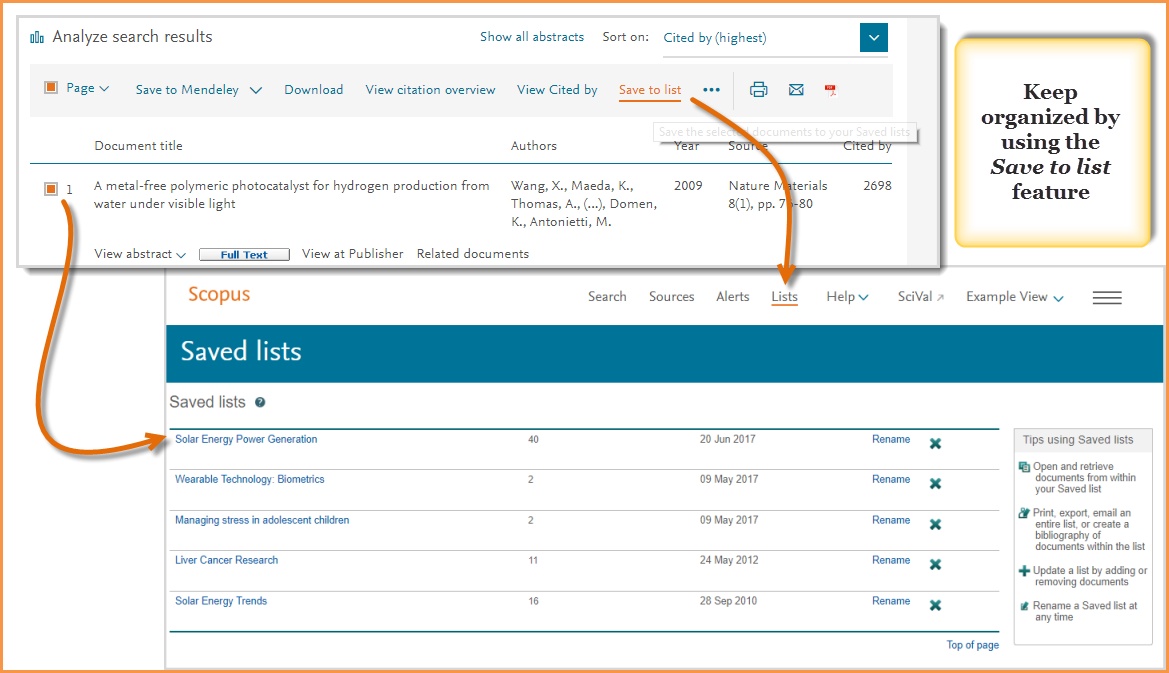
As you find documents that you want to save and come back to, make sure you mark them by clicking on the box to the left of the title. Then, once ready, click on “Save to list”. This prevents you from losing your work and the progress you have made. You can name your list, or if you are registered and logged in, select from a list you have already named and saved.
From your saved lists, you can also use tools to both further analyze your results, such as looking at documents that have cited your selections, or going back to view the references from your selections.
You can also use the export feature to:
  • Save your selections to Mendeley
  • Export directly to RefWorks or SciVal
  • Select a file type to export in, such as RIS format, CSV, BibTeX, Text
These tips should help you get a good start on searching, refining and organizing your research on Scopus, but if you need help along the way find more support material on the Scopus Support Center.

Tuesday, 21 March 2017

Getting Published in Science: Seminar on Wednesday 29th March at 9.30am, FOCAS


Getting published is a major driver in academia and is a very competitive activity. Dr. Matt Walker, a customer consultant from the publisher Elsevier, will be giving this session on how to maximize your chances of having your publication accepted by a quality journal.

Please note that the session, which will take place in the seminar room of the DIT FOCAS Research Institute, is discipline specific to science.

To book a place on Wednesday 29th March please click here.

Monday, 9 March 2015

ORCHID and SCOPUS : organize your research profile


When your research activities happen across multiple sources, it can be a challenge to organize and distinguish your work from that of others. The solution? Establish an ORCID record so you can better manage this challenge. ORCID.org, a non-profit community-driven organization, offers a transparent way for you to link your research activities and outputs to one unique identifier. Through a partnership between Scopus and ORCID.org, you can connect your Scopus author ID and publication records with your ORCID identifier. Once the two IDs are linked, visitors to your Scopus Author Profile page can click on your ORCID number to access your complete author record in ORCID. Click here to review and send your Scopus Author details to ORCID. 
Watch this short video to learn more about Scopus and ORCID.
Tip: Scopus allows you to search for an author by ORCID number. From ‘Author Search’ go to the ORCID box and enter the ID you wish to find.
Learn more about ORCID on their website, visit ORCID’s news page, or follow ORCID on Twitter

Thursday, 12 February 2015

Altmetric for SCOPUS

Altmetric for Scopus is a powerful 3rd party web application that runs within the new DIT Library database Scopus . It appears in the sidebar of the article and abstract pages. It's a quick and easy way to see all of the social or mainstream media mentions gathered for a particular paper as well as reader counts on popular reference managers.
The Altmetric application is currently installed for all Scopus users by default but will only appear in the sidebar when there is data available for the article that you're currently viewing. You can find it underneath the "Related Documents" box on the right hand side of the screen.

What does Altmetric do?

Altmetric watches social media sites (e.g. Twitter, Facebook, Pinterest, Google+), science blogs, many mainstream media outlets (including the NY Times, The Guardian, non-English language publications like Die Zeit & Le Monde and special interest publications like Scientific American, New Scientist) and reference managers for mentions of academic papers.
It cleans up this data, enriches it and then allows authors, readers and researchers to see it in context.
Though not every article is discussed in public online Altmetric tracks over a hundred thousand mentions a week. Well worth a look alongside the regular bibliometric SCOPUS functionality.

Thursday, 10 October 2013

Engage in Research: Bioscience Students Resource


Engage in Science is a resource designed to help bioscience students with advice and assistance on the most important aspects of scientific research. Whether you need help with identifying resources, doing a literature review or  you're struggling with statistical analyses, you'll find the information here. You'll also find worked examples, exercises with answers, help sheets and quick quizzes to help you gauge your understanding.

Thursday, 26 September 2013

Utopia: connecting pdf content to the web


Finding, reading, and citing articles can be the most time-consuming part of scientific research. Utopia Documents v2.2  (@utopiadocs) is a freeware research utility that makes this easier by offering a PDF reader with built-in exploration tools that connects the static content of scientific pdf articles to the live web content.
Although it can be considered as a direct competitor to services like Zotero and ReadCube Utopia Docs is both similar and different. Initially it looks like a PDF reader, and while it be used as one, it lacks simple features such as annotations and highlights. Its strength lies in the sidebar, where extra live web-linked  information is listed about every pdf article loaded. Here you can find and open related articles and create and link to citations.  Start by loading a PDF from a desktop or pasting a PDF URL. 
Utopia Docs works only with PDFs and you will still need a pdf reader and indepth citation tool. 

Thursday, 4 April 2013

Science Direct free visual apps

The Lancet  carries multimedia items such as podcasts and video’s that are not available on ScienceDirect. This application appears alongside The Lancet articles in ScienceDirect and will list these featured multimedia items enabling users to click through and view them on the Lancet. View a ScienceDirect sample article.


Protein Viewer is a Jmol-based application for ScienceDirect which is displayed below the abstract if the article contains author-tagged protein identifiers, allowing you to browse through all protein models tagged in the article and interactively explore each of them.


The Elsevier’s 3D molecular viewer visualizes molecular structures provided by the authors next to the Science Direct article, in the right hand side panel. View the Science Direct example article


Thursday, 7 February 2013

Genetic Testing = TMI?

Like much new scientific technology, human genetic testing offers many advantages but also presents  problems. Genetic testing can now detect over 2,500 medical conditions, but only about 500 of these are treatable. So do you really want to know about the likelihood of this happening to you or your family? William Reville presents the pros and cons in today's IT article.

Thursday, 24 January 2013

Shall I compare thee to a strand of DNA?

For billions of years DNA has been life’s data storage medium. Now, according to an Nature article scientists have used DNA to code and store their media and information, from all of Shakespeare’s sonnets to an audio recording of Martin Luther King’s ‘I have a dream’ speech. There is also an RSC Chemistry World article on the topic of high capacity stable synthesized DNA - see blogpost title.  So is it time to finally dump all those dvds and cds? The commercial data storage potential is just beginning to get interesting.

Wednesday, 3 October 2012

JournalTOCs - shortcuts to keeping research up-to-date


JournalTOCs is the largest free collection of scholarly tables of contents (TOCs) from over 20,000 journals for use by students and researchers. JournalTOCs alerts you when new issues of your followed journals are published.  Most followed journals for September were Nature, Science, NEJM, the Lancet, and JAMA.

To get the full-text of a journal article check the DIT Library eJournal listings for availability

If you are a previous ticTocs user please note that your account and contents of your MyTOCS folder has been transferred to JournalTOCs, so your current awareness service continues without interruption.